Smart Locks Updated July 20, 2026

The Best Wi-Fi Smart Locks Without a Subscription

We compared the best-selling Wi-Fi deadbolts — the ones you can lock, unlock, and check from your phone — against thousands of verified buyer reviews to find the ones that just work, with no monthly fee.

OUR TOP PICK

Wyze Auto-Lock Bolt v2 $79.00

★★★★☆ (4.6/5) 475 reviews
Best Wi-Fi Smart Locks Without a Subscription
Verified Buyer Reviews Built on feedback from real owners
Unbiased Reviews Honest recommendations always
In-Depth Research Thorough product analysis

Top Picks

#1 BEST OVERALL
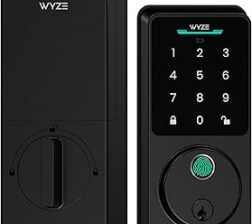
Wyze Auto-Lock Bolt v2

Wyze Auto-Lock Bolt v2

Best choice for most users

$79.00

★★★★☆ (4.6/5) 475 reviews

  • Fingerprint recognition
  • Wi-Fi connectivity
  • Auto-lock functionality
  • Temporary access codes

BUY ON AMAZON

We may earn a commission from qualifying purchases.

See full review
#2 RUNNER UP
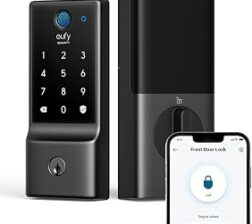
eufy Security C220 Fingerprint Lock

eufy Security C220 Fingerprint Lock

Reliable with multiple access options

$109.99

★★★★☆ (4.3/5) 3,900 reviews

  • Fingerprint recognition
  • Built-in Wi-Fi
  • App remote control
  • 8-month battery life

BUY ON AMAZON

We may earn a commission from qualifying purchases.

See full review
#3 ALSO GREAT
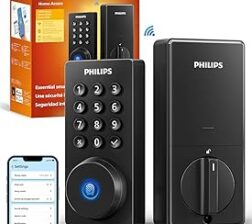
Philips Wi-Fi Keypad Deadbolt

Philips Wi-Fi Keypad Deadbolt

Affordable option with good smart features

$79.98

★★★★☆ (4.4/5) 965 reviews

  • Keyless entry via app
  • Fingerprint passcode unlock
  • Built-in WiFi for remote access
  • Compatible with Alexa & Google Assistant

BUY ON AMAZON

We may earn a commission from qualifying purchases.

See full review
Doorbell Cameras Compared

Related Guide

Doorbell Cameras Compared

We look at the top doorbell cameras that are NOT Amazon, Ring, or Blink.

Read Guide →

Quick Comparison

Feature Wyze Auto-Lock Bolt v2 eufy Security C220 Fingerprint Lock Philips Wi-Fi Keypad Deadbolt
Price $79.00 $109.99 $79.98
Lock/unlock from your phone (Wi-Fi)
Fingerprint + keypad entry
Works with Alexa & Google
No monthly subscription
Long battery life (no heavy drain)
Consistent, trouble-free operation
Ties into a broad device ecosystem
BUY ON AMAZON BUY ON AMAZON BUY ON AMAZON

* Pricing subject to change.

Our Scorecard

How our top picks scored on the factors that matter most, rated 0–10.

Criteria Wyze Auto-Lock Bolt v2 eufy Security C220 Fingerprint Lock Philips Wi-Fi Keypad Deadbolt
App Connectivity
9/10
8/10
7/10
Battery Life
7/10
5/10
3/10
Ease of Use
9/10
8/10
8/10
Build Quality
8/10
6/10
6/10
Smart Features
9/10
8/10
8/10
Value
10/10
8/10
9/10
Overall 8.7 7.2 6.9

Scores are our editorial assessment, weighing verified-buyer ratings, review volume, features, and value.

Detailed Reviews

#1 BEST OVERALL

Wyze Auto-Lock Bolt v2

$79.00
★★★★☆ (4.6/5) 475 reviews
Buy on Amazon

The Wyze Auto-Lock Bolt v2 is a reliable and convenient smart lock that is perfect for those seeking an affordable option with excellent integration capabilities.

What Reviewers Say

The Wyze Auto-Lock Bolt v2 has received positive feedback for its ease of installation and reliability. Users appreciate the fingerprint recognition feature, which has proven to work flawlessly for multiple users. The ability to manage temporary access codes is a standout feature, allowing homeowners to grant access to contractors or guests without needing to provide a physical key.

The remote locking capability via the Wyze app provides additional peace of mind, especially for those who may forget to lock their doors. However, some users have reported that the auto-lock feature can sometimes engage while the door is still open, which may pose a risk for young children. Additionally, the fingerprint scanner is only for unlocking, which limits its functionality compared to some competitors.

Overall, the Wyze Auto-Lock Bolt v2 is a solid choice for those looking for a smart lock that integrates well with existing Wyze products and offers convenience and flexibility.

Pros

  • Easy installation and setup
  • Reliable fingerprint recognition
  • Integration with Wyze ecosystem
  • Ability to manage temporary access codes
  • Remote locking for peace of mind

Cons

  • Auto-lock feature can lock with door open
  • Fingerprint unlock only, not lock
  • Some setup instructions may be confusing

Best For

This product is ideal for tech-savvy homeowners who already use Wyze products and are looking for a smart lock that offers convenience and integration with their existing smart home ecosystem, all at an affordable price point.

Key Specifications

Battery Life 8 months
Water Resistance IP53
Lock Type Deadbolt
Keypad Type Anti-Peep
Security Rating BHMA2
#2 RUNNER UP

eufy Security C220 Fingerprint Lock

$109.99
★★★★☆ (4.3/5) 3,900 reviews
Buy on Amazon

Consider the eufy Smart Lock C220 for its ease of use and smart features, but be prepared for potential battery management.

What Reviewers Say

The eufy Security Smart Lock C220 stands out as a user-friendly solution for those looking to upgrade to a keyless entry system. Many users appreciate its easy installation process, often completed in under 30 minutes, and the seamless integration with the eufy app, which allows for remote locking and unlocking. Reviewers have noted that the lock generally functions as advertised, with reliable access through fingerprint recognition and customizable entry codes.

However, there are some concerns regarding battery life; while advertised to last up to 8 months, several users reported needing to replace batteries much sooner, particularly if using the Wi-Fi features frequently. Additionally, some have experienced intermittent Wi-Fi connectivity issues, requiring occasional reboots to restore functionality. Despite these drawbacks, the overall consensus is that the eufy Smart Lock C220 is a solid choice for those prioritizing convenience and smart home compatibility, making it particularly suitable for tech-savvy homeowners or those looking to enhance their home security without the hassle of traditional keys.

Pros

  • Easy installation and setup
  • Reliable app connectivity
  • Multiple access options (fingerprint, code)
  • Good build quality
  • User-friendly interface

Cons

  • Battery life may be shorter than advertised
  • Occasional Wi-Fi connectivity issues
  • Inconsistent fingerprint recognition

Best For

Homeowners seeking a reliable and modern solution for keyless entry, particularly those who prioritize smart home features and ease of use over the potential downsides of battery life.

Key Specifications

Battery Type AA
Battery Life Up to 8 months
Water Resistance IP53
Security Rating BHMA Grade 3
Connectivity Wi-Fi
#3 ALSO GREAT

Philips Wi-Fi Keypad Deadbolt

$79.98
★★★★☆ (4.4/5) 965 reviews
Buy on Amazon

Consider the Philips Wi-Fi Door Lock if you're looking for an affordable smart lock with convenient features, but be prepared for potential battery and connectivity issues.

What Reviewers Say

The Philips Wi-Fi Door Lock offers a budget-friendly solution for homeowners seeking a smart locking system. Reviewers appreciate its easy installation process and user-friendly app that allows for remote locking and unlocking. Many users have highlighted the convenience of the fingerprint passcode feature and the ability to control the lock via Alexa and Google Assistant.

However, a significant concern among users is the battery life, with multiple complaints about the lock draining batteries quickly, often within a few days. This can be a major drawback for those who prefer a low-maintenance option. Additionally, some users have reported connectivity issues, where the lock goes offline and requires a reconnect, disrupting its intended convenience.

Despite these downsides, the Philips Wi-Fi Door Lock is praised for its affordability and functionality, making it suitable for tech-savvy homeowners looking for a smart lock solution without breaking the bank. It is particularly beneficial for those who value remote access and ease of use but may not be ideal for users who require a lock with longer battery life.
Pros

  • Easy installation and setup
  • Good customer service
  • Remote locking/unlocking via app
  • Affordable compared to competitors
  • User-friendly app interface

Cons

  • Poor battery life
  • Frequent disconnections
  • Requires 8 AA batteries

Best For

This product is best suited for budget-conscious homeowners who want the convenience of smart locking features without the high price tag. It's ideal for those who appreciate technology but may not have high expectations for battery longevity.

Key Specifications

Battery Type 8 AA batteries
Compatibility Alexa & Google Assistant
Lock Type Deadbolt
Remote Control Yes
Auto Lock Feature Yes

FAQs

Do smart locks require a monthly subscription?

No. Every lock on this list works fully without a paid plan – keypad codes, app unlock, and auto-lock are all free. Some brands sell optional cloud extras, but you never need a subscription to lock, unlock, or manage codes.

What happens if the batteries die?

Most run on 4 AA batteries and last roughly 6-12 months, warning you well before they quit. Many also have a physical key backup or external contacts you can jump with a 9V battery, so a dead battery never locks you out.

Do I have to replace my whole deadbolt?

Usually not. Most of these retrofit onto your existing deadbolt – you keep your current keys and exterior hardware and only swap the interior. A few replace the full deadbolt; we note which is which.

Will it work with my phone, Alexa, or Google?

Bluetooth models unlock from your phone at the door. For remote access and voice control, pick a model with built-in Wi-Fi or add the brand's Wi-Fi bridge – then you can lock up and check status from anywhere.

Are keypad codes secure?

Yes. You can set multiple codes plus temporary or auto-expiring guest codes and delete any of them instantly. Look for a model that scrambles the keypad or requires a wake press so worn fingerprints don't reveal your code.

Can I still use a physical key?

Many keep a keyway as a backup; some are keyless and rely on code, app, or fingerprint only. Choose based on whether you want a traditional key as a fallback.

How hard is installation?

Most take 15-30 minutes with just a screwdriver. Retrofit models are the easiest since you leave the exterior hardware in place and only replace the inside thumbturn.

Do they still work when the internet is down?

Yes. The keypad, codes, and auto-lock all run locally on the lock itself. Only remote and app features need Wi-Fi, so an outage never leaves you stuck outside.

Ready to Make Your Choice?

Check out our top pick and see why thousands of readers trust our recommendations.

See Our #1 Pick →
Wyze Auto-Lock Bolt v2

#1 PICK: Wyze Auto-Lock Bolt v2

Best Smart Lock for Convenience

VIEW